

Auth0
Feature/OIDC support
✅ PKCE
❌ Nonce
✅ State
✅ Access Token validation
⚠️ ID Token validation (Supported, but disabled by default)
Introduction
Provider specific parameters
Additional parameters to be used in additionalAuthParameters, additionalTokenParameters or additionalLogoutParameters:
| Option | Type | Default | Description |
|---|---|---|---|
| connection | string | - | Optional. Forces the user to sign in with a specific connection. For example, you can pass a value of github to send the user directly to GitHub to log in with their GitHub account. When not specified, the user sees the Auth0 Lock screen with all configured connections. You can see a list of your configured connections on the Connections tab of your application. |
| organization | string | - | Optional. ID of the organization to use when authenticating a user. When not provided, if your application is configured to Display Organization Prompt, the user will be able to enter the organization name when authenticating. |
| invitation | string | - | Optional. Ticket ID of the organization invitation. When inviting a member to an Organization, your application should handle invitation acceptance by forwarding the invitation and organization key-value pairs when the user accepts the invitation. |
| loginHint | string | - | Optional. Populates the username/email field for the login or signup page when redirecting to Auth0. Supported by the Universal Login experience. |
| audience | string | - | Optional. The unique identifier of the API your web app wants to access. |
Depending on the settings of your apps Credentials tab, set authenticationScheme to body for 'Client Secret (Post)', set to header for 'Client Secret (Basic)', set to '' for 'None'
Opaque access tokens without an audience
When no API audience is requested or configured as the tenant's default, Auth0 issues an opaque access token intended for its /userinfo endpoint. Opaque tokens cannot be decoded or validated locally as JWTs, so configure both access-token opt-outs:
auth0: {
  redirectUri: 'http://localhost:3000/auth/auth0/callback',
  baseUrl: '',
  clientId: '',
  clientSecret: '',
  skipAccessTokenParsing: true,
  tokenValidationMode: 'strict',
  validateAccessToken: false,
  validateIdToken: true,
},
Strict mode does not override the access-token opt-outs and validates the enabled ID token independently while preserving the opaque access token.
Example Configuration
auth0: {
  audience: 'test-api-oidc', // In case you need access to an API registered in Auth0
  redirectUri: 'http://localhost:3000/auth/auth0/callback',
  baseUrl: '', // For example https://dev-xyz.eu.auth0.com or leave blank for environment
  clientId: '', // Leave blank to use environment variable
  clientSecret: '', // Leave blank to use environment variable
  scope: ['openid', 'offline_access', 'profile', 'email'],
  additionalTokenParameters: { // In case you need access to an API registered in Auth0
    audience: 'test-api-oidc',
  },
  additionalAuthParameters: { // In case you need access to an API registered in Auth0
    audience: 'test-api-oidc',
  },
},
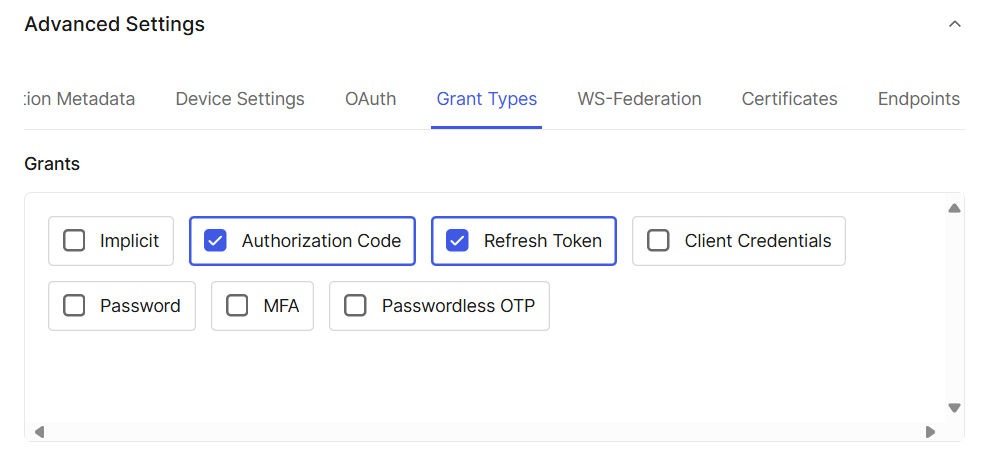
Make sure these grants are enabled in Auth0:
Environment variables
Dotenv files are only for (local) development. Use a proper configuration management or injection system in production.
NUXT_OIDC_PROVIDERS_AUTH0_CLIENT_SECRET=CLIENT_SECRET
NUXT_OIDC_PROVIDERS_AUTH0_CLIENT_ID=CLIENT_ID
NUXT_OIDC_PROVIDERS_AUTH0_BASE_URL=https://dev-xyz.eu.auth0.com